
What's the best way to charge for shipping?
Start with the simplest option that covers your real costs: a flat rate, free shipping over an order amount, or both, plus local pickup if customers are nearby. Use live carrier rates only when your products vary a lot in weight or size. Then print labels from your store so tracking reaches the customer automatically.
The short version
- Similar-sized products? A flat rate is simplest and easiest for customers to understand.
- Want free shipping? Make it free over an order amount that still leaves you a profit.
- Products vary a lot in weight? Live carrier rates charge closer to the real cost, but need weights and sizes on every product.
- Local customers? Add local pickup, or local delivery by zip code.
- Print labels from the store, so tracking goes to the customer and sits on the order.
How do I choose?
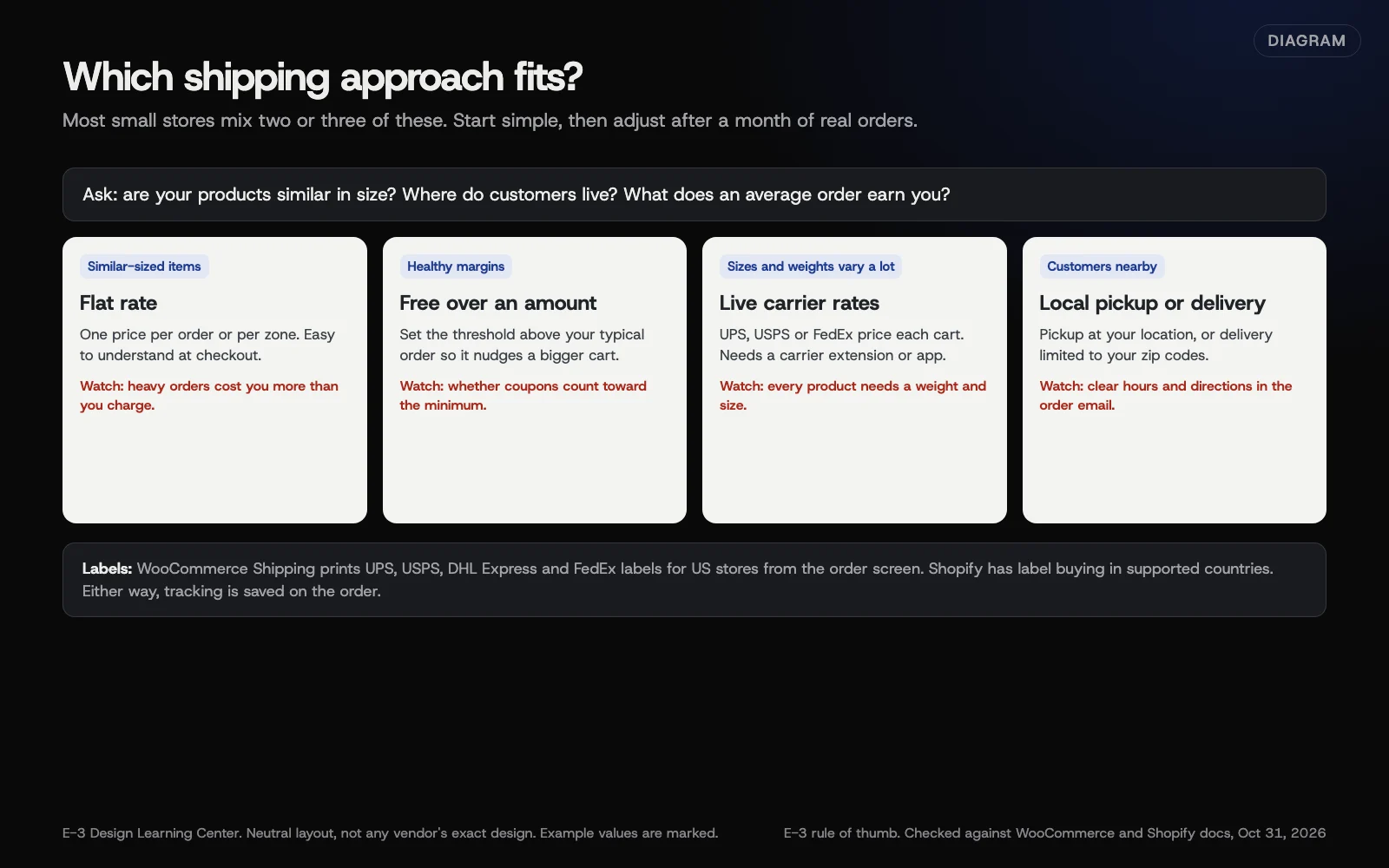 Diagram: choosing a shipping approach from what you sell and where it goes. E-3’s rule of thumb, based on WooCommerce and Shopify shipping documentation (October 2026).
| Approach | Good for | Watch out for |
|---|---|---|
| Flat rate | Products of similar size, such as apparel, books or prints | Heavy orders cost you more than you charge |
| Free over an amount | Encouraging bigger orders | The threshold has to cover your average shipping cost |
| Free on everything | High-margin items, often with shipping built into the price | Prices look higher next to competitors |
| Live carrier rates | Mixed sizes and weights, furniture, equipment | Every product needs accurate weight and size |
| Local pickup or delivery | Customers in your town | Clear pickup hours and directions |
Many small stores land on a mix: a flat rate, free shipping over a set amount, and local pickup. Start there, then look at a month of real orders and adjust.
How do I work out the numbers?
- Pull last quarter’s orders and what you actually paid to ship each one.
- Find your typical order value and typical shipping cost.
- Set the flat rate near your typical cost.
- If you offer free shipping, set the threshold above your typical order, so it nudges people to add an item.
- Recheck every few months, and whenever carriers change their prices.
How do I set these up?
The settings clicks are in our help article on changing shipping rates or sales tax. A few details matter for strategy.
Free shipping over an amount, in WooCommerce. WooCommerce’s free shipping guide says the Free shipping requires dropdown offers: No requirement, A valid free shipping coupon, A minimum order amount, A minimum order amount OR a coupon, and A minimum order amount AND a coupon. When you pick a minimum, a box appears: Apply minimum order rule before coupon discount. Leave it unticked and a coupon can drop an order below the free-shipping line. Tick it and the minimum is checked before the discount.
Live carrier rates, in WooCommerce. These come from a carrier extension, such as the UPS, USPS or FedEx shipping method extensions. Every product needs a weight and size, or rates come out wrong.
Shopify. Shopify’s shipping rates page lists flat rates, free shipping and carrier-calculated rates, organised by shipping zones and profiles. Shopify notes that shipping profiles and rates are gradually moving to “shipping options by market,” and stores keep their current setup until they’re upgraded. If your screens don’t match an older tutorial, that’s likely why.
How do I print shipping labels?
WooCommerce Shipping is WooCommerce’s label tool for US stores that sell in US dollars. Its documentation says it creates labels for UPS, USPS, DHL Express and FedEx from inside WooCommerce, using WooCommerce’s discounted rates, so you don’t need your own carrier account.
- Open the order in WooCommerce, Orders.
- In the shipping label section, select Create shipping labels.
- Choose the package, carrier and service, then buy and print.
The tracking number is saved on the order. Two things to know: WooCommerce Shipping doesn’t show live rates at checkout, which needs a separate carrier extension. And labels are charged to the card saved on the WordPress.com account that connected the store. The documentation says it can’t complete label payments that need 3D Secure, so use a card that doesn’t.
Shopify has its own label buying in the admin for supported countries, and both platforms work with outside shipping apps.
Why does it matter?
Shipping is where many carts get abandoned: the customer sees the total at the last step and leaves. Charge too little and it comes out of your profit on every order. A clear, fair rule, shown early, avoids both.
Tracking matters too. Tracking on the order is your best evidence if a customer later says a parcel never came. See handling disputes and chargebacks.
What are the common mistakes and edge cases?
- No weights on products with live rates, giving zero or silly quotes.
- Shipping zones in the wrong order in WooCommerce. The first matching zone wins.
- Free shipping that a coupon breaks, because of the minimum-order setting above.
- Promising delivery dates you can’t control. Say “ships within 2 business days” instead of “arrives Friday.”
- Forgetting oversize or fragile items. Give them their own shipping class or rate.
- A lapsed carrier extension licence that quietly stops live rates. Customers then can’t check out.
What if this didn’t work?
- Customers see no shipping options. Their address doesn’t match any zone, or a carrier extension has lost its connection.
- Rates look far too high or low. Check product weights, box sizes and the units your store uses.
- Label purchase fails. Check the card on the connected WordPress.com account, and whether it needs 3D Secure.
How much does it cost, and how long does it take?
The core shipping settings are free in both platforms. Carrier rate extensions and shipping apps often carry their own fees; check each one’s page. Setting up a simple flat-rate and free-shipping mix takes under an hour, including a test order to each zone.
How does E-3 handle this?
Send us your rules, such as “flat rate, free over a set amount, local pickup on weekdays,” and a person at E-3 sets them up, places test orders to each zone, and shows you the checkout before it goes live. On stores in our website care, monitoring tracks plugin-license renewals, so a carrier extension doesn’t lapse unnoticed.
Related questions
Next step
- Next: How do I create a coupon or discount code?The next guide in Online stores.
- Free website checkPublic checks on your own site, then an action plan of what to fix first.
Still stuck? Ask E-3 for an answer from our help guides.
Rather we handled online stores for you?
It’s part of what we do every week for small businesses, as part of website care. Start with a free check of your site and profile, or call and ask.