
Which payment provider should my online store use?
Pick the provider that fits how you sell, not the one with the loudest ad. On Shopify, Shopify Payments is the default, and other providers add transaction fees. On WooCommerce, compare WooPayments, Stripe, PayPal and Square on fees, payouts, in-person selling and support. Many stores run one card provider plus PayPal.
The short version
- On Shopify: use Shopify Payments where it’s available. Shopify says other providers used alongside it add transaction fees.
- On WooCommerce: compare WooPayments, Stripe, PayPal and Square. All four have official WooCommerce extensions.
- Sell in person too? Choose a provider whose card reader and online store share the same products and stock.
- Offer PayPal as well if your customers expect it. It sits beside your card provider.
- Choose a hosted card field or page, so card numbers never touch your website.
How do I choose?
WooCommerce’s own guide to choosing a gateway lists the questions to ask. We’ve added the ones we see trip owners up.
| Question | Why it matters |
|---|---|
| What are the full fees? | Per-transaction fees, monthly fees, extension costs, and fees for disputes and refunds. Read the provider’s own pricing page. |
| Does it work in your country and currency? | Not every provider serves every country, and some features are US-only. |
| How does card entry work? | A hosted field or page keeps card numbers off your site, which keeps your security paperwork simple. |
| Do you sell subscriptions? | You need a provider that can charge a saved card again. |
| Do you sell in person? | A shared provider keeps one product list and one set of payouts. |
| Who answers when it breaks? | The extension maker, the provider, or both. Know before launch day. |
| What does it share about customers? | WooCommerce reminds stores to mention the provider in the privacy policy. |
The main options, as the vendors describe them
- Shopify Payments is Shopify’s built-in provider. Shopify’s Shopify Payments page says it removes the need for a separate merchant account, and that transaction fees apply if you use a third-party provider alongside it. It’s available in certain countries only.
- WooPayments is WooCommerce’s own payment extension. WooCommerce says it’s free to install, with no setup or monthly fee, and charges per transaction.
- Stripe connects through the WooCommerce Stripe extension. Its card field or hosted checkout page keeps card numbers on Stripe’s side.
- PayPal Payments is PayPal’s official WooCommerce extension. Its documentation covers Pay Later, Venmo, card processing, Apple Pay and Google Pay.
- Square has an official extension. WooCommerce’s Square guide says it takes payments and keeps products and stock levels aligned between WooCommerce and your Square account, which suits shops with a counter as well as a website.
- Offline methods: Direct bank transfer, Check payments and Cash on delivery are built into WooCommerce. WooCommerce notes that your site doesn’t process these, so you confirm each payment yourself.
We don’t rank them, and we don’t quote fees here, because both change. Check each provider’s pricing page on the day you decide.
How do I set it up safely?
- Create the provider account in the business’s name, with an email address the business controls, not a staff member’s personal one.
- Install the official extension for that provider. Avoid copies from unknown sources.
- Connect it in test mode first. Every major provider has a test mode with test card numbers. Place a test order end to end.
- Switch to live mode, then place one small real order and refund it. That proves payments, emails and refunds all work.
- Turn on two-step login on the provider account. Shopify requires it for Shopify Payments.
- Write down who has access, and remove people who leave.
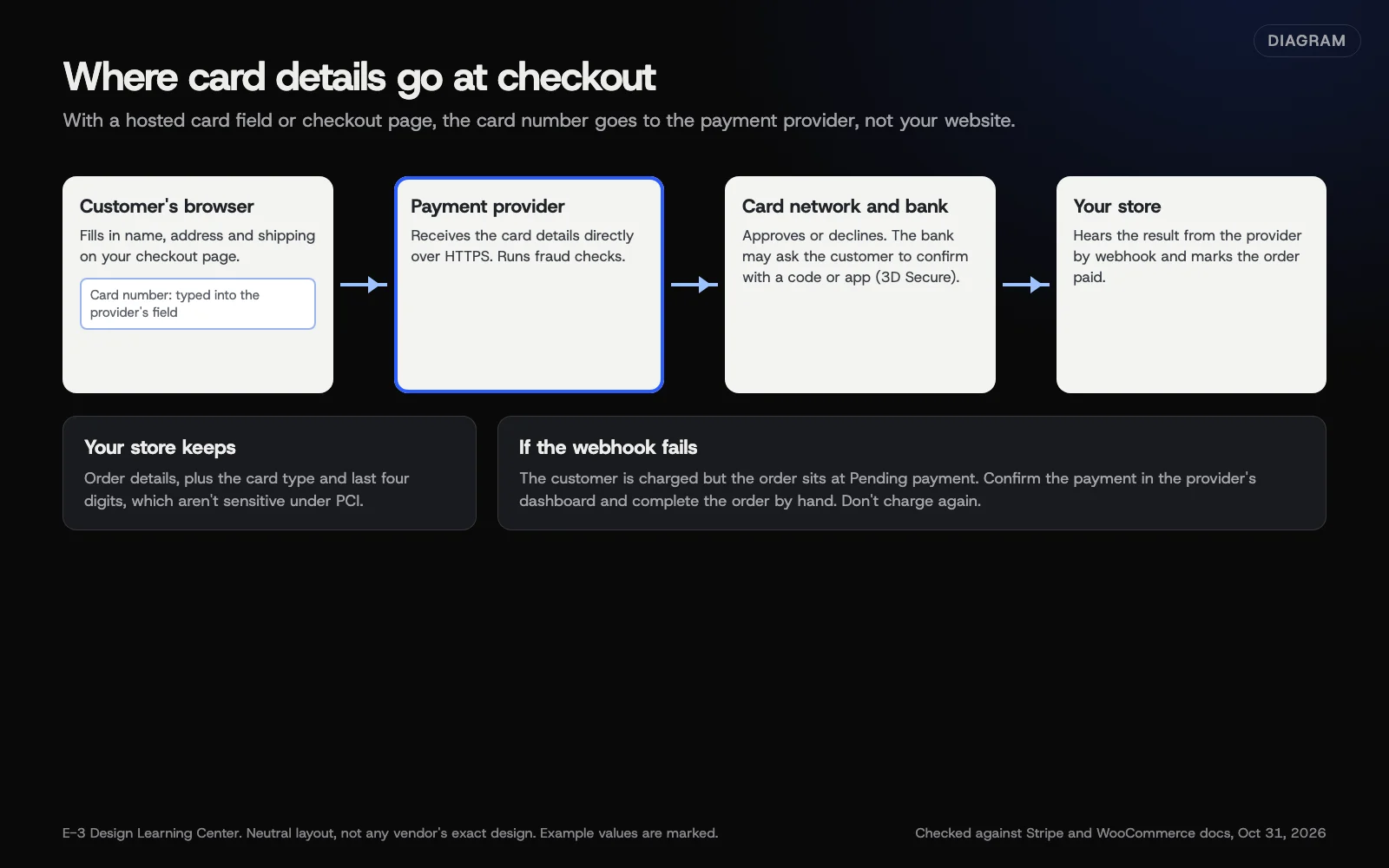 Diagram: where card details go at checkout when you use a provider’s hosted payment field or page, and how the provider tells your store the payment worked. Based on Stripe and WooCommerce documentation (October 2026).
Why does the choice matter?
Checkout is where the money happens. A provider that fits your business pays out on a schedule you can live with, handles refunds and disputes clearly, and stays quiet in the background. One that doesn’t fit leads to surprise holds, extra fees and confused customers.
It also decides how much security work lands on you. Stripe’s integration security guide says a business that handles card numbers directly can face more than 300 security controls, while hosted fields and pages reduce that. Our guide to PCI and store security explains what’s left for you.
What are the common mistakes and edge cases?
- The account is in a former employee’s name. Payouts and disputes then depend on someone who’s gone.
- Two card providers at once. Two places to check, two sets of fees, two dashboards for refunds. One card provider plus PayPal is usually plenty.
- Test mode left on after setup, so real cards fail.
- Ignoring extra checks at the bank. Some banks ask customers to confirm a payment with a code or their banking app. Stripe’s 3D Secure page explains that this is required for many European cards and optional elsewhere. A checkout that can’t show that step loses those sales.
- Switching providers without saved-card plans. Saved cards and subscriptions don’t always move. Ask both providers before you switch.
What if payments stop working?
That’s covered step by step in our help article on why checkout isn’t working. In short: look up the failed payment in the provider’s dashboard first, because it shows the reason. If you’re seeing a flood of small failed payments, read about card testing attacks.
How much does it cost, and how long does it take?
Fees differ by provider, card type and country, so we won’t quote them. Expect per-transaction fees, and read each provider’s dispute and refund terms. Setting up and testing a provider takes an hour or two, plus any identity checks the provider runs before your first payout.
How does E-3 handle this?
E-3 creates accounts in the client’s name, with E-3 added as a user, so the business always owns its payment account. We connect the provider, run test orders, and check the confirmation emails before anything goes live. On stores in our website care, the payment extension gets tested updates, and monitoring tracks plugin-license renewals so a lapsed extension doesn’t break checkout. For the bigger platform question, see WooCommerce or Shopify.
Related questions
Sources
- Payment gateway extensions: how to choose (WooCommerce documentation)
- Shopify Payments (Shopify Help Center)
- WooCommerce Square (WooCommerce documentation)
- WooCommerce PayPal Payments (WooCommerce documentation)
- Integration security guide (Stripe documentation)
- 3D Secure authentication (Stripe documentation)
Next step
- Next: What do I do when a customer disputes a charge?The next guide in Online stores.
- Free website checkPublic checks on your own site, then an action plan of what to fix first.
Still stuck? Ask E-3 for an answer from our help guides.
Rather we handled online stores for you?
It’s part of what we do every week for small businesses, as part of website care. Start with a free check of your site and profile, or call and ask.