
Which Microsoft 365 Business plan does my team need?
Pick Business Basic if your team works in a browser and on phones, Business Standard if people need the desktop Word, Excel and Outlook apps, and Business Premium if you need to manage laptops and phones or want Microsoft's stronger email and sign-in protection. All three include business email and suit up to 300 users.
The short version
- Basic: email, Teams, OneDrive and the web and phone versions of the Office apps.
- Standard: everything in Basic, plus desktop Word, Excel, PowerPoint and Outlook.
- Premium: everything in Standard, plus device management and stronger security tools.
- Every person needs a license, but plans can be mixed in one account.
- Check whether you’re buying a version with or without Teams.
What does each plan include?
Microsoft’s plan options page lists the three Business plans side by side. Each one adds to the one before it, and the whole Business family is limited to 300 users in one account.
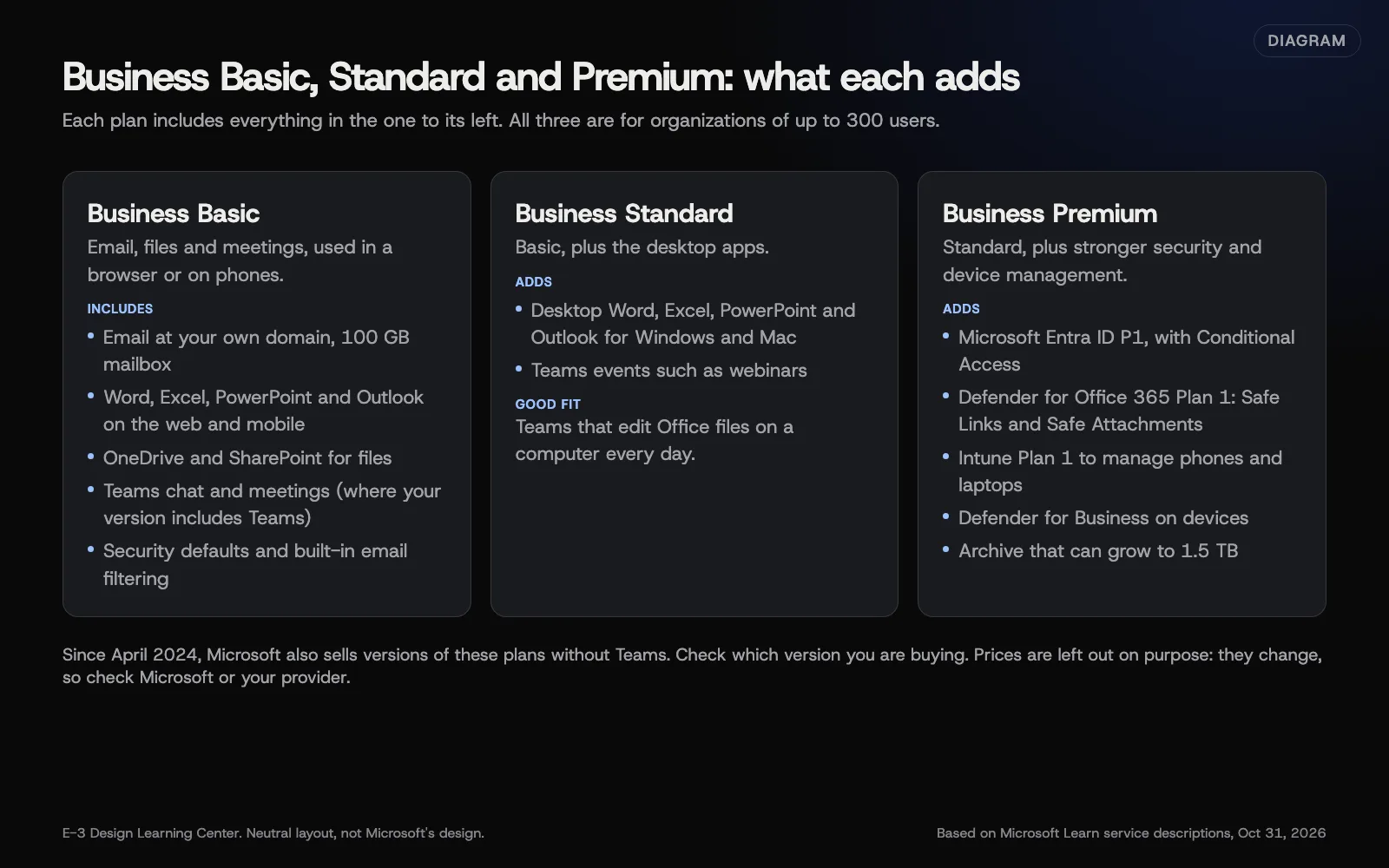 Diagram: what each Microsoft 365 Business plan adds, based on Microsoft Learn service descriptions (October 2026). Prices left out on purpose.
| Basic | Standard | Premium | |
|---|---|---|---|
| Business email (Exchange Online) | Yes | Yes | Yes |
| Mailbox size | 100 GB | 100 GB | 100 GB |
| Office apps on the web and phones | Yes | Yes | Yes |
| Desktop Office apps | No | Yes | Yes |
| OneDrive and SharePoint | Yes | Yes | Yes |
| Conditional Access (Entra ID P1) | No | No | Yes |
| Safe Links and Safe Attachments | No | No | Yes |
| Device management (Intune Plan 1) | No | No | Yes |
The mailbox sizes come from Microsoft’s Exchange Online limits page. Microsoft raised Business plans from 50 GB in 2026, and Business plans now offer mailboxes of up to 100 GB. The security rows come from Microsoft’s security overview for business plans.
How do I choose?
Work through these questions in order. Stop at the first one that settles it.
- Do you need to manage company laptops and phones? If you want to wipe a lost phone’s work data or push settings to laptops, that’s Intune, which comes in Premium.
- Do people open Office files on a computer all day? Bookkeepers, estimators and office staff usually want the desktop apps. That means Standard or Premium.
- Do you handle sensitive client data, money or legal paperwork? Premium adds Conditional Access, plus Safe Links and Safe Attachments for email. Those are the tools that let an admin set rules like “only allow sign-in from managed devices.”
- Is it mostly email, calendar and the odd document? Basic covers it. People can still open and edit Word and Excel files in a browser or on their phone.
You don’t have to put everyone on the same plan. Microsoft says you can mix Business, Enterprise and standalone plans in one account. A common pattern is Standard for office staff and Basic for people who mainly read email on a phone.
Why does the choice matter?
Every license is a monthly cost, so the wrong plan either wastes money or leaves a gap. One typical gap: an office on a plan without desktop apps, where staff keep using an old copy of Office. Microsoft no longer lets old sign-in methods connect to Exchange Online, so that old copy can start causing password prompts. See why Outlook keeps asking for a password. The opposite mistake is paying for Premium security tools nobody ever turns on.
What changed recently?
- Plans with and without Teams. Since April 1, 2024, Microsoft has sold Business plans both with Teams and without it, outside the European Economic Area and Switzerland, according to its licensing announcement. Existing customers could keep their Teams versions. Check which version a quote is for.
- Bigger mailboxes. Business mailboxes went from 50 GB to 100 GB in 2026.
- Teams live events retired. Microsoft’s Teams service description says live events were replaced by Teams events and retired on June 30, 2026. Webinars and town halls are listed for Business Standard and Premium.
What are the common mistakes?
- Buying Microsoft 365 Apps for business by accident. It has the desktop apps but no email. It won’t work for a mailbox move.
- Assuming Premium is “more storage.” Mailbox size is the same on all three plans. Premium’s main extra is security and device management, plus a much larger archive.
- Choosing before you know who needs what. List each person and what they do first.
- Forgetting shared addresses. A shared mailbox like info@ usually doesn’t need its own license. See shared mailbox, distribution list or group.
What if we picked the wrong plan?
You can move up within the Business family, from Basic to Standard for example. Moving down, or removing licenses, can be limited by your billing terms. Our guide to licenses and billing explains the seven-day window Microsoft applies to many subscriptions.
How much does it cost?
Microsoft charges per user, and prices vary by plan, country and billing term. We don’t list prices here because they change. Compare the current prices on Microsoft’s site or with your provider, and compare the yearly total, not the monthly headline.
How does E-3 handle this?
“Can you move my email to Microsoft 365?” comes up dozens of times in our support records, and the plan question always comes first. We go through who does what, recommend a plan for each person, and set the account up in your business’s name with E-3 added as a user. If you’re weighing Google too, read Microsoft 365 or Google Workspace.
Related questions
Sources
Common questions
- Can different people be on different plans?
- Yes. Microsoft says you can combine Business, Enterprise and standalone plans in one account, so an office manager can have Standard while a field worker has Basic.
- Can we switch plans later?
- Yes. Microsoft lets you move up within the same family, for example from Business Basic to Business Standard. Check your billing terms first, because some changes only apply at renewal.
- Do all plans include business email?
- Basic, Standard and Premium all include Exchange Online email. Microsoft 365 Apps for business does not include email, so it isn't a fit if you're moving mailboxes.
Next step
- Next: Which DNS records change when email moves to Microsoft 365?The next guide in Microsoft 365 for small business.
- Free website checkPublic checks on your own site, then an action plan of what to fix first.
Still stuck? Ask E-3 for an answer from our help guides.
Rather we handled microsoft 365 for small business for you?
It’s part of what we do every week for small businesses, as part of managed wordpress hosting. Start with a free check of your site and profile, or call and ask.