
Why SSL certificates expire so often now
Browser makers and certificate authorities agreed to shorten how long a public SSL certificate can last: 200 days for those issued since March 15, 2026, then 100 days from March 2027 and 47 days from March 2029. Free Let's Encrypt certificates already last 90 days or less. Renewal must be automatic, with a warning if it fails.
The short version
- The limit is shrinking in steps: 200 days for certificates issued now, 100 days for those issued from March 15, 2027, 47 days from March 15, 2029.
- It goes by issue date. A certificate issued before a cut-off keeps the lifetime it was issued with.
- It applies to every public certificate, paid or free.
- Manual renewal is no longer practical. Your host or certificate service must renew automatically.
- Let’s Encrypt no longer emails expiry reminders, so use a monitor.
- If you buy certificates by the year, ask your provider how they’ll handle reissuing within the year.
What exactly changed?
In April 2025 the CA/Browser Forum, the group of certificate authorities and browser makers that sets the rules for public certificates, passed ballot SC-081v3. It cuts the longest allowed lifetime from 398 days to 47 days in steps between March 2026 and March 2029.
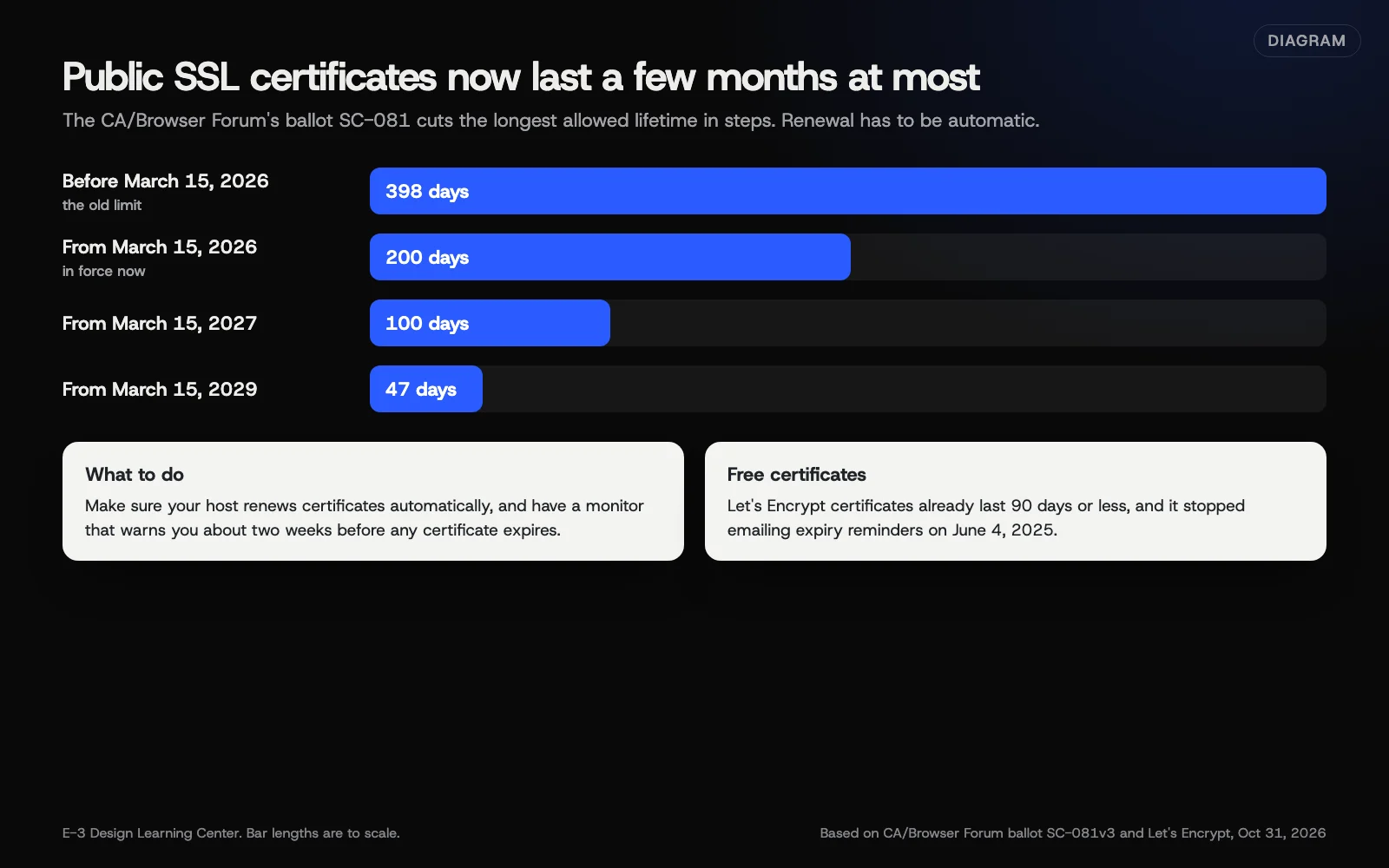 Diagram: the maximum lifetime of a public SSL/TLS certificate, before and after each step of CA/Browser Forum ballot SC-081. Bar lengths are to scale. Based on the CA/Browser Forum and Let’s Encrypt (October 2026).
| Certificate issued | Longest it can last |
|---|---|
| Before March 15, 2026 | 398 days |
| March 15, 2026 to March 14, 2027 | 200 days |
| March 15, 2027 to March 14, 2029 | 100 days |
| On or after March 15, 2029 | 47 days |
The limits depend on when a certificate is issued. The Baseline Requirements, section 6.3.2, set each limit for certificates “issued on or after” its date. A certificate issued before March 15, 2026 with a 398-day life isn’t cut short; the shorter limit applies from its next renewal.
The same ballot also shortens how long a certificate authority can reuse its earlier check that you control the domain, which is why renewals increasingly need your setup to prove control each time, automatically.
Let’s Encrypt, the free certificate authority many hosts use, is moving faster. Its announcement sets its default certificates at 64 days from February 10, 2027 and 45 days from February 16, 2028, down from 90.
What should I do?
- Find out who issues your certificate. Click the padlock or site information icon in your browser, then the certificate details. Note the issuer and the expiry date.
- Ask your host one question: “Is our certificate renewed automatically, and what happens if renewal fails?” A good answer names the method and who gets alerted.
- If you buy certificates yourself, ask your provider how a yearly purchase works now that each newly issued certificate lasts 200 days or less. Many reissue during the term, but someone has to install each one unless it’s automated.
- Cover every address. Check
wwwand the plain domain, plus any subdomains like a shop or booking page. Each needs to be covered. - Set up an expiry monitor that warns you two weeks ahead. Our free domain and SSL expiry checker shows today’s dates. Our guide to uptime, SSL and domain monitoring shows how.
- Recheck after any server or DNS change. Moves are when automatic renewal most often breaks.
Why are lifetimes getting shorter?
Shorter certificates limit how long a lost or wrongly issued certificate can be misused, and they push everyone onto automated renewal, which makes the system easier to update quickly when it needs to. For a small business, the practical effect is simple: a certificate you renew by hand once a year is no longer possible.
Why does it matter for my site?
An expired certificate puts a full-page warning in front of every visitor. Most leave. If your site uses HSTS, visitors can’t click past it at all, as MDN’s HSTS page explains. Forms stop being trusted, and online orders stop.
And you may get no warning. Let’s Encrypt stopped sending expiry emails on June 4, 2025, and recommends a monitoring service instead.
What are the common mistakes?
- Assuming “free SSL” means someone is watching it. Automatic renewal can silently fail, often after a DNS or server change.
- A certificate that covers
wwwbut not the plain domain, or the other way round. - A proxy and a server with different certificates. With a service like Cloudflare in front of the site, both the edge certificate and the one on your server need to be valid.
- Renewal reminders going to someone who left. Update the contact email at your certificate provider and host.
- Old devices on an office network pointing at a previous server after a move, so they see an old, expired certificate while everyone else is fine.
What if my certificate has already expired?
Go to our help page on the Not Secure warning. It explains each browser message and what your host needs to do. Don’t tell customers to click “Proceed anyway.”
How much does it cost, and how long does it take?
Free certificates through Let’s Encrypt and most managed hosts cost nothing. Paid certificates are priced by the provider. Checking your setup takes about 15 minutes. If renewal isn’t automated, setting it up is a job for your host or developer.
How does E-3 handle this?
“Why does my site say Not Secure, and how do I get SSL?” comes up about 96 times in E-3’s support records since 2019. A failed renewal and a mismatch between a proxy and the server are two common causes of an expired certificate. SSL is included with our hosting, and for the sites we look after, we can check that automatic renewal is working. Our managed hosting page explains what’s included when we host your site.
Related questions
Sources
- Ballot SC-081v3: Introduce schedule of reducing validity and data reuse periods (CA/Browser Forum)
- Baseline Requirements, section 6.3.2: certificate validity periods (CA/Browser Forum, GitHub)
- Decreasing certificate lifetimes to 45 days (Let's Encrypt)
- Ending support for expiration notification emails (Let's Encrypt)
- Strict-Transport-Security header (MDN Web Docs)
Next step
- Next: How to check your website works on phonesThe next guide in Website basics.
- Website careUptime monitoring, tested updates, daily backups and security alerts.
Still stuck? Ask E-3 for an answer from our help guides.
Rather we handled website basics for you?
It’s part of what we do every week for small businesses, as part of website care. Start with a free check of your site and profile, or call and ask.