
Set up HTTPS redirects and HSTS the safe way
Pick one main address, such as https://www.yourbusiness.com, and make every other version (http, with or without www) redirect to it permanently in one step. Fix any page that still loads items over http. Only then add HSTS, starting with a short max-age, and raise it to a year when nothing breaks. Preloading isn't recommended and is hard to undo.
The short version
- Choose one main address and stick to it everywhere.
- Redirect every other version to it with a permanent (301) redirect, in one hop.
- Fix mixed content: no images, scripts or forms loading over plain http.
- Then add HSTS: a short max-age first, a year once you’re sure.
- Skip preload. The list’s own site no longer recommends it, and it’s slow to undo.
If your browser already shows “Not Secure,” fix that first with our help page on the Not Secure warning. This guide is for a site that has a certificate and wants HTTPS set up properly.
How do I set it up, step by step?
1. Choose your main address
Decide whether your site lives at https://www.yourbusiness.com or https://yourbusiness.com (examples). Either is fine. What matters is that it’s one, and that your Google Business Profile, Search Console, email signatures and printed material all use it.
On a standard single-site WordPress install, the two address fields under Settings, then General, can usually be switched to https. Do it this way:
- Take a full backup of the files and the database first, and check you know how to restore it.
- Confirm the certificate already works by loading the https address. If it doesn’t, stop here, or you can lock yourself out of the admin.
- Change only the start of each address from
http://tohttps://. Keep everything after the domain exactly as it is.
The two fields aren’t always the same. WordPress’s guide to changing the site URL explains that WordPress Address (URL) is where WordPress’s own files live and Site Address (URL) is the address visitors type. If WordPress sits in its own subfolder, the first one ends with that folder name. Keep it. If the site is a WordPress multisite network, or the two fields already differ and you’re not sure why, stop and ask your host or developer. Multisite addresses are changed in the database, not on this screen.
2. Check the four versions
Type each into a browser and see where you land:
http://yourbusiness.comhttp://www.yourbusiness.comhttps://yourbusiness.comhttps://www.yourbusiness.com
All four should end at your main address with no warning. To see the hops, open your browser’s developer tools, choose the Network tab, tick Preserve log and load the http address. You want one redirect with status 301 (or 308), not a chain, and no 302 temporary redirects.
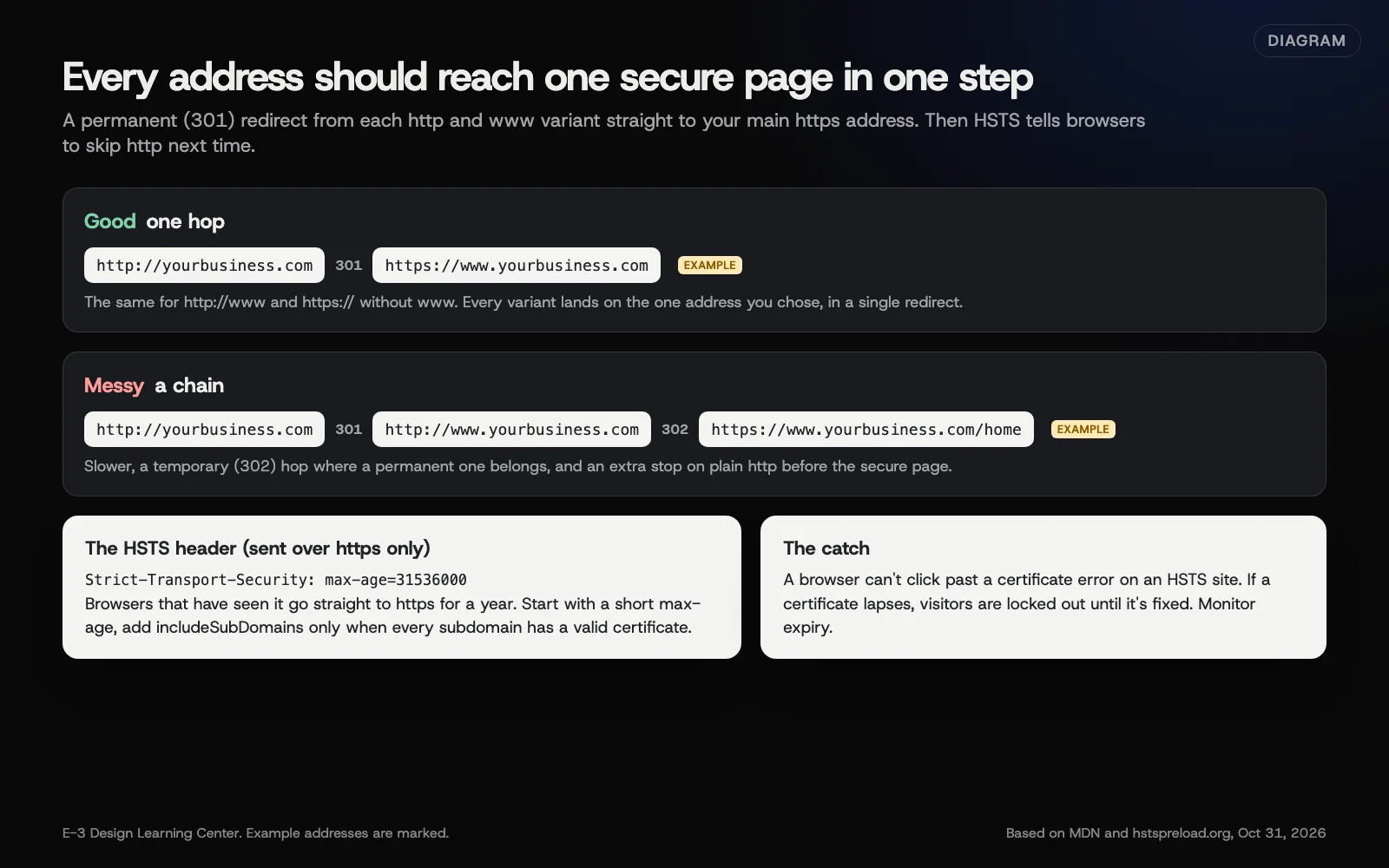 Diagram: a clean one-step redirect compared with a redirect chain, and what the HSTS header does. Example addresses are marked. Based on MDN and hstspreload.org (October 2026).
3. Fix the redirect where it’s set
Redirects are set at the host, in the server configuration, or at a service in front of the site such as Cloudflare. Set them in one place only. Two layers of redirects fighting each other is what causes loops and chains.
4. Fix mixed content
Open your main pages, then the browser’s developer tools Console. Warnings about “mixed content” mean an item still loads over http. Usually it’s an image or link typed with http:// in old content. Replace those with https.
5. Add HSTS, carefully
HSTS is a response header that tells browsers to use only https for your domain for a set time. MDN’s HSTS page explains it, and notes that browsers ignore the header over plain http.
- Start short:
Strict-Transport-Security: max-age=300(five minutes). Check the site, forms and admin still work. - Raise it in steps, such as a day, then a month.
- End at a year:
Strict-Transport-Security: max-age=31536000. - Add
includeSubDomainsonly after you’ve confirmed every subdomain, including mail, shop or booking ones, has a valid certificate.
Starting short is our advice, not a rule from MDN. It limits the damage if something you didn’t know about breaks.
On Cloudflare, HSTS is under SSL/TLS, then Edge Certificates, then HTTP Strict Transport Security (HSTS), then Enable HSTS. Its HSTS page offers max-age from 1 to 12 months and warns that turning HTTPS off before HSTS expires makes the site unreachable.
6. Check your other security headers
Run your address through Mozilla’s free HTTP Observatory. It reviews HSTS and other headers and explains each finding. Treat it as a to-do list for whoever manages the site. Some headers, such as a content security policy, take real testing to add without breaking things.
Should I preload HSTS?
Usually not. Preloading puts your domain on a list built into browsers, so even a first visit uses https. hstspreload.org, which runs the list, now says plainly that HSTS is recommended but preloading is not. Its rules are strict: a valid certificate, http redirecting to https on the same host first, every subdomain on https, and a header with max-age of at least a year, includeSubDomains and preload. It also warns that removal can take months to reach users.
That same-host rule changes the redirect advice above. A preloaded site must first send http://yourbusiness.com to https://yourbusiness.com, then on to www if that’s your main address. That’s two hops, and it’s expected.
For most small businesses, the one-year header is enough.
Why does it matter?
HTTPS protects what visitors type into your forms, and browsers flag plain http pages. A messy redirect chain slows every first visit and can split your search history between two addresses. HSTS closes the gap where a visitor types your address without https and could be intercepted before the redirect.
What are the common mistakes?
- Redirects set in two places, such as a plugin and the host, causing loops.
- 302 instead of 301, telling search engines the move is temporary.
- Turning on
includeSubDomainswhile an old subdomain has no certificate. Browsers then refuse it, and visitors can’t click past. - Letting the certificate lapse on an HSTS site. With HSTS, visitors can’t click through a certificate warning at all. See why SSL certificates expire so often now.
- An office network or old DNS still pointing at a previous server after a move, so some people see an expired certificate while everyone else is fine. This often follows a server move.
What if something broke?
- Redirect loop (“too many redirects”): remove one of the two redirect layers.
- Admin locked out after changing WordPress addresses: restore your backup, or ask your host or developer to reset the two addresses in the database or
wp-config.php. - A subdomain stopped working after HSTS: the fix is a valid certificate on that subdomain. Changing the header helps less than you’d hope. MDN’s HSTS page says a browser updates its saved rule each time it gets the header over a working https connection, and
max-age=0turns the rule off. But a browser that can’t load your site over valid https never sees the new header and keeps the old rule until it runs out. A rule a subdomain set for itself stays separate, and a preloaded domain stays in browsers for months. That’s why to start short.
How much does it cost, and how long does it take?
Redirects and headers cost nothing and take under an hour for someone who manages the hosting. The HSTS ramp-up takes a few days to a few weeks, depending on how cautious you are.
How does E-3 handle this?
SSL is included with E-3’s hosting. If your site doesn’t have HTTPS yet, E-3 can install a certificate, switch the whole site to https, replace old http links and check the forms still send. See our managed hosting page for what hosting with us covers.
Related questions
Next step
- Next: Why SSL certificates expire so often nowThe next guide in Website basics.
- Website careUptime monitoring, tested updates, daily backups and security alerts.
Still stuck? Ask E-3 for an answer from our help guides.
Rather we handled website basics for you?
It’s part of what we do every week for small businesses, as part of website care. Start with a free check of your site and profile, or call and ask.