
Website basics for owners: the complete guide
A healthy small-business website rests on a few basics: a domain the business owns and renews automatically, DNS and hosting you can name, HTTPS everywhere, pages that work quickly on phones and for people with disabilities, tested updates, backups you've restored at least once, and monitoring that tells you when something breaks before customers do.
Download the website care checklist (PDF)6 pages, 438 KB, free to print. What's inside
The short version
- Own the address. The domain is registered to your business, locked and set to auto-renew.
- Know who does what. Write down your registrar, DNS host, web host and email host, and keep the logins in the business’s name.
- Secure and fast. HTTPS on every page, and pages that load quickly and work on phones.
- Usable by everyone. The accessibility basics from W3C’s guidelines.
- Safe to change. Tested updates, daily backups you’ve restored at least once, and monitoring that alerts a person.
How do I look after a website, step by step?
Most owners don’t need to know how a website works inside. You do need to know what it depends on, who controls each part, and what to check. Work through these in order. Each part links to a deeper guide or to an existing answer on our site.
1. Know the four jobs behind your web address
Your website and email depend on four separate jobs. One company can do all of them, or four different ones can.
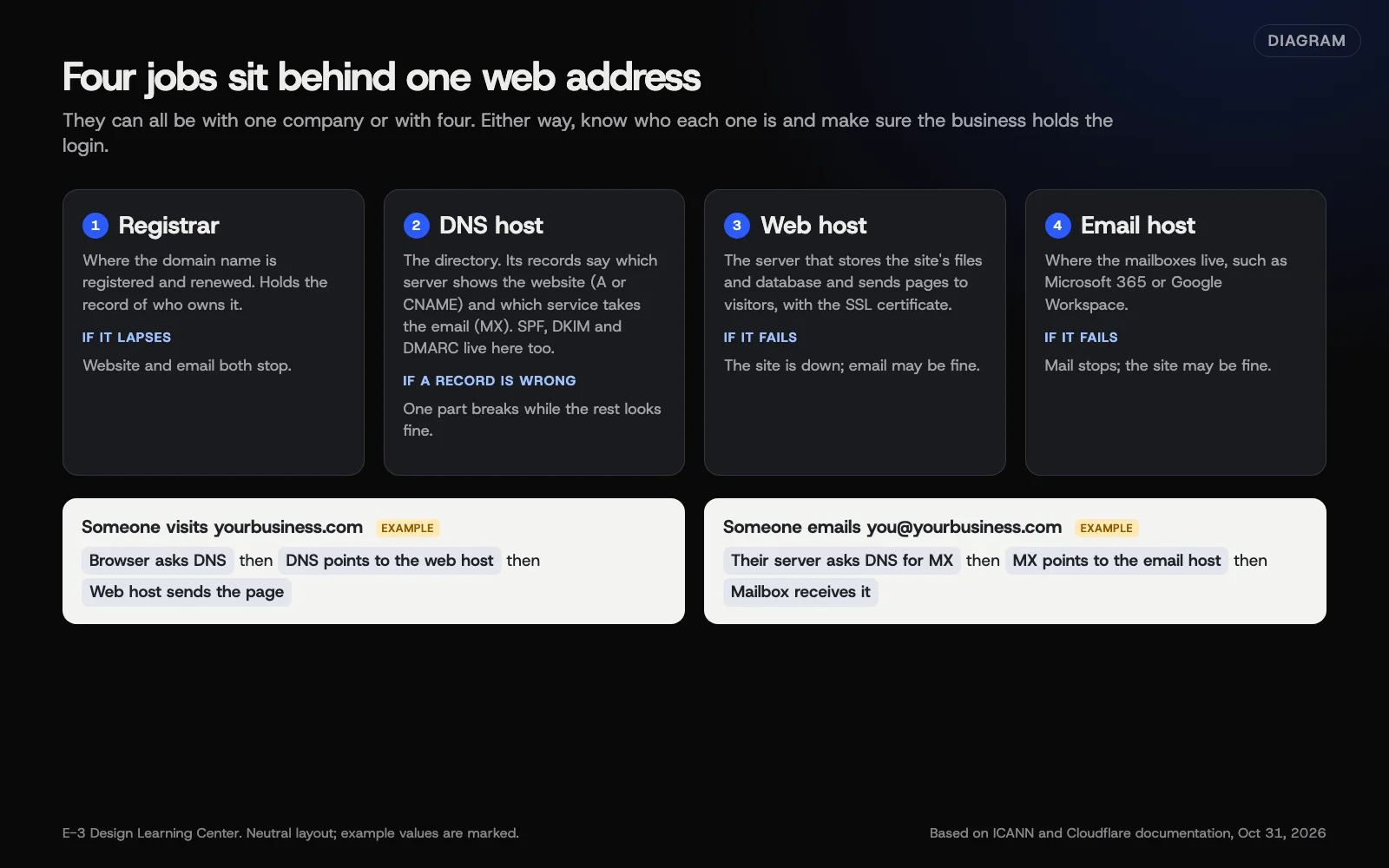 Diagram: the four jobs behind one web address (registrar, DNS host, web host, email host) and how a visit and an email travel through them. Example values are marked. Based on ICANN and Cloudflare documentation (October 2026).
- The registrar holds your domain registration. If it lapses, the website and email both stop; our answer on what happens when a domain expires explains the grace periods.
- The DNS host publishes the records that point your domain at the web server and the mail service. Our answer on what DNS is covers the basics, and changing DNS safely covers edits.
- The web host stores and serves the site.
- The email host keeps your mailboxes. Getting that email delivered is its own topic; see our business email that lands hub.
Write down which company does each job and which login controls it. If you can’t, start with our help page on who owns your domain and who to call.
2. Protect the domain
Your domain is the one piece you can’t easily replace. Register it in the business’s name with contact details you control, turn on auto-renew with a payment card that won’t expire soon, and ask your registrar for a transfer lock. ICANN’s registrant guidance also recommends multi-factor sign-in at the registrar and notes that ICANN never emails renewal notices itself. Our guide to protecting your domain covers locks, renewal and DNSSEC. Our answer on who should own your domain covers ownership.
3. Choose hosting that fits the site
Shared hosting, managed WordPress hosting and static hosting suit different sites. What matters is the software versions the host runs, backups you can restore, security, support you can reach, and an easy way out. WordPress.org’s requirements page recommends PHP 8.3 or newer and HTTPS support. See how to choose web hosting. If you’re moving, our answer on moving to a new host gives the order of steps.
4. Use HTTPS properly
Every page should load over https, every other version of your address should redirect there in one step, and the certificate should renew on its own. Once that’s solid, the HSTS header tells browsers to skip plain http. See setting up HTTPS redirects and HSTS. If your site already says “Not Secure,” start with our help page on the Not Secure warning.
Certificates also last much less time than they used to. Under the CA/Browser Forum’s ballot SC-081, the longest a newly issued public certificate can last fell to 200 days in March 2026 and will reach 47 days in 2029. Certificates issued before each cut-off keep their original lifetime. See why SSL certificates expire so often now.
5. Make it fast, especially on phones
Most slow small-business sites have the same few causes: huge images, too many plugins and outside scripts, and no caching. Our article on website speed on phones puts the fixes in order, and our answers explain Core Web Vitals, image sizes and what a low PageSpeed score really means. If your site is slow right now, see why a website is slow.
6. Check it works on phones
Speed is one part. The other is whether the layout, menus, buttons and forms work on a small touch screen. Google retired its Mobile-Friendly Test on December 1, 2023, so checking now means a real phone plus a browser’s device mode. See how to check your site works on phones. If something already looks wrong, see why a site looks wrong on phones.
7. Make it usable for people with disabilities
Low contrast, missing alt text, unlabeled form fields and things you can’t reach with a keyboard block the most people. Our article on a practical start to accessibility covers those. The current W3C standard, WCAG 2.2, added nine success criteria in 2023, including minimum tap-target sizes and not hiding the keyboard focus. See what WCAG 2.2 changed for small-business sites. Our answers on whether your site needs to be ADA accessible and accessibility overlays cover the legal side (this isn’t legal advice).
8. Keep WordPress safe without breaking it
Updates close security holes, but they occasionally break a page or form. The answer is a backup first, updates in a controlled way, and a check afterward, not skipping them. Our article on WordPress security for small businesses covers the habits, and our answers cover plugin updates, how many plugins is too many, staging sites, user roles, passwords and two-factor authentication.
9. Back up, and prove the backup works
CISA’s backup guidance for small businesses calls the 3-2-1 rule a trusted guideline: three copies of important files, on two different types of storage, with one copy off-site. It also says to run backups automatically and regularly, and to test that you can restore them. For a website, our advice is to back up the files and the database at least daily and before every change, store a copy away from the web server, and restore one to a test copy a few times a year. Those website specifics are ours, not CISA’s. A backup nobody has restored is a hope, not a plan.
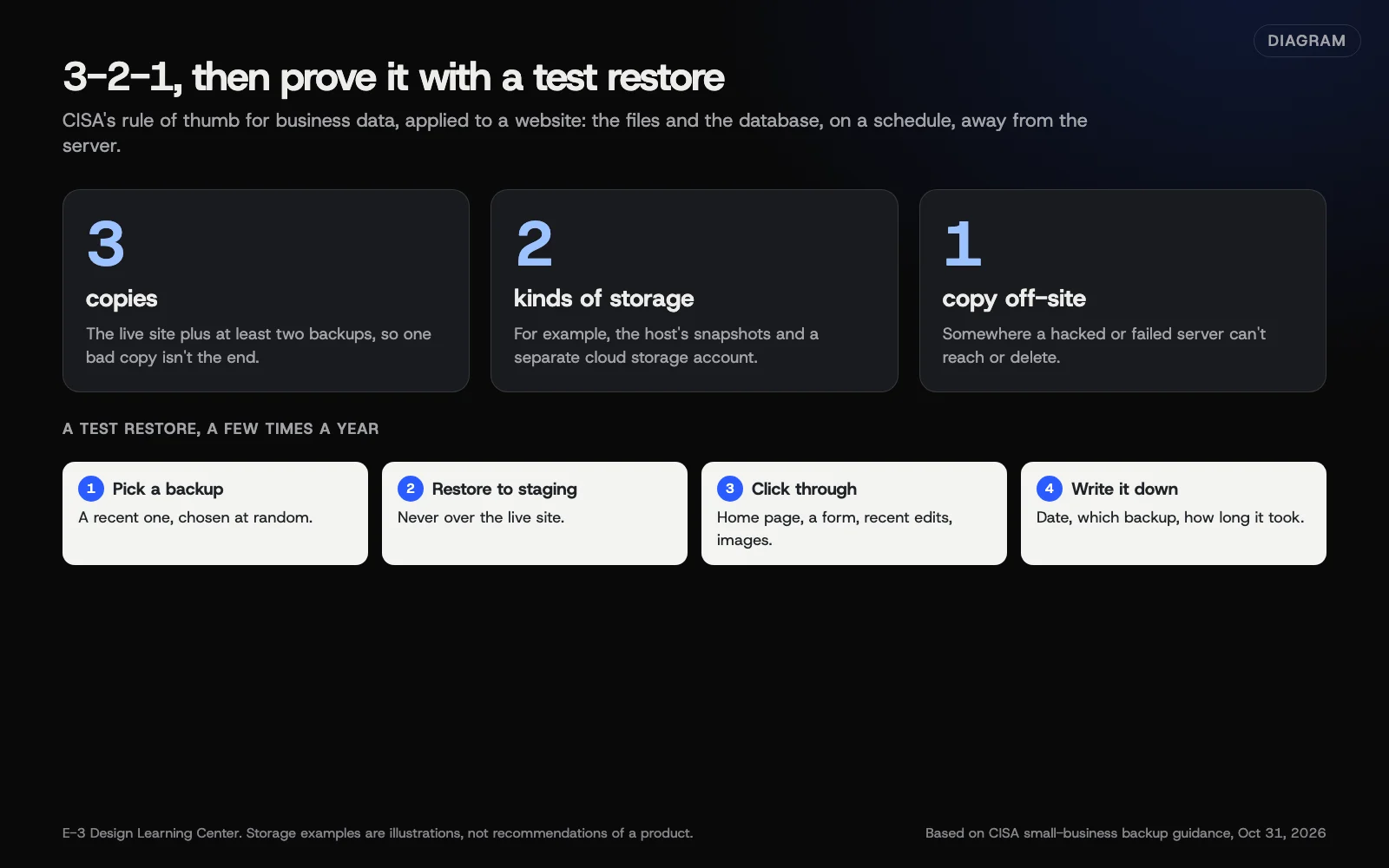 Diagram: the 3-2-1 backup rule applied to a website, and a four-step test restore. Based on CISA small-business backup guidance (October 2026).
Our answer on how often to back up WordPress covers frequency and what a good backup includes, and our help page on backups and restores lists what to ask your host.
10. Monitor it
A monitor checks your site from outside every few minutes and alerts a person when it fails. Good monitoring also watches your contact page, certificate expiry and domain renewal. See how to set up uptime, SSL and domain monitoring. If the site is down right now, go to why is my website down.
11. Keep the paperwork
When someone builds or changes your site, you should come away with the logins, licenses, files and notes you need to carry on without them. See what to get when your website is finished, and our article on owning your digital assets for the wider list.
Why do the basics matter?
Because many website emergencies are one of these basics gone quiet. A domain renewal charged to an expired card. A certificate that stopped renewing after a server move. A plugin nobody updated for years. A backup that turned out to be empty. None of these is hard to prevent, yet each one can take your site and email offline at the worst moment.
The basics also feed everything else you want from a website. Google’s page experience guidance says a good experience on mobile and secure delivery are part of what it looks for, and customers simply leave a site that’s slow or broken on their phone.
What are the most common mistakes?
- The domain or hosting is in someone else’s name, often a former employee or a web company you no longer use.
- Auto-renew is off, or the card on file has expired.
- Nobody knows where DNS is managed, so changes get made at the wrong company.
- Old software. PHP 8.2 gets only security fixes and reaches end of life on December 31, 2026, per PHP.net. Older versions get no fixes at all.
- Backups on the same server as the site, so a hack or server failure takes both.
- No monitoring, so a customer is the first to notice an outage.
- Plugins piling up that nobody uses or updates.
- Accessibility treated as a widget instead of fixes to the site itself.
What has changed recently?
As of October 31, 2026:
- Google’s Mobile-Friendly Test and Mobile Usability report retired on December 1, 2023. Google pointed to Lighthouse and other tools.
- Certificate lifetimes are shrinking: 200 days for certificates issued since March 15, 2026, then 100 days from March 2027 and 47 days from March 2029.
- Let’s Encrypt stopped sending expiry reminder emails on June 4, 2025, per its announcement. If you relied on those emails, you need a monitor.
- WCAG 2.2 became a W3C Recommendation on October 5, 2023, and removed the old 4.1.1 Parsing criterion.
- WordPress now recommends PHP 8.3 or newer and MariaDB 10.11 or MySQL 8.0 or newer.
What if something goes wrong?
- The site is down: Why is my website down?
- A white screen or “critical error”: My site shows a critical error or a white screen
- A “Not Secure” warning: Why does my site say Not Secure?
- You think you were hacked: I think my site was hacked, and why Google says a site may be harmful
- The domain expired: What happens if my domain name expires?
- You need an old version back: Is my website backed up, and can you restore it?
How much does it cost, and how long does it take?
Domains, hosting, certificates and monitoring all have free or low-cost options, and prices vary widely by provider, so compare current pricing yourself. The ongoing time is small but regular. Our article on the website care checklist lays out a routine of a few minutes a week, about an hour a month and a longer yearly review. Our answer on what website maintenance includes explains what’s worth paying someone for.
How does E-3 handle this?
In E-3’s support records since 2019, there are about 550 requests about sites down, errors and security, and about 450 about domains, DNS and SSL. That’s why these basics matter to us. For the WordPress sites we host, our monitoring tracks PHP versions, waiting plugin and theme updates, known plugin vulnerabilities, disk and database space, and the renewal dates of domains and premium plugin licenses. Redesigns and speed fixes are tested on a staging copy first. Our website care adds uptime monitoring, updates tested on a staging copy first, daily backups and security alerts, and our managed hosting includes SSL.
Every guide in this hub
- How do I choose web hosting for a small-business website? Shared, managed and static hosting, and what to check before you sign up.
- How do I set up HTTPS redirects and HSTS? One-step redirects, the HSTS header and security headers, safely.
- Why do SSL certificates expire so often now? The 2026 to 2029 schedule and what to automate.
- How do I check my site works on phones? A real-phone checklist now that Google’s test is gone.
- What did WCAG 2.2 change for small-business sites? The new criteria in plain words, and the quick fixes.
- How do I set up uptime, SSL and domain monitoring? What to watch, how often and who gets the alert.
- How do I protect my domain from expiry and theft? Auto-renew, locks, registrar security and DNSSEC.
- What should I get when my new website is finished? The handover list: logins, licenses, files and notes.
Related questions
Sources
- Do you have a domain name? Here's what you need to know (ICANN blog)
- WordPress requirements (WordPress.org)
- Supported versions (PHP.net)
- Strict-Transport-Security header (MDN Web Docs)
- Ballot SC-081v3: Introduce schedule of reducing validity and data reuse periods (CA/Browser Forum)
- Ending support for expiration notification emails (Let's Encrypt)
- The role of page experience in creating helpful content (Google Search Central Blog)
- What's new in WCAG 2.2 (W3C Web Accessibility Initiative)
- Back up business data (CISA)
- Responsive web design basics (web.dev)
Every Website basics guide
- How to choose web hosting for a small-business websitePick hosting by what your site is and who looks after it. A WordPress site that brings in business usually belongs on managed WordPress hosting with current PHP, daily off-server backups, staging and real support. A simple brochure site can run on static hosting. Before signing up, make sure you'll own the account and can take a full copy.
- Set up HTTPS redirects and HSTS the safe wayPick one main address, such as https://www.yourbusiness.com, and make every other version (http, with or without www) redirect to it permanently in one step. Fix any page that still loads items over http. Only then add HSTS, starting with a short max-age, and raise it to a year when nothing breaks. Preloading isn't recommended and is hard to undo.
- Why SSL certificates expire so often nowBrowser makers and certificate authorities agreed to shorten how long a public SSL certificate can last: 200 days for those issued since March 15, 2026, then 100 days from March 2027 and 47 days from March 2029. Free Let's Encrypt certificates already last 90 days or less. Renewal must be automatic, with a warning if it fails.
- How to check your website works on phonesGoogle retired its Mobile-Friendly Test in December 2023, so check by hand. Open your key pages on a real iPhone and Android phone, in portrait and landscape. Confirm nothing scrolls sideways, text reads without zooming, buttons are easy to tap, the menu and forms work, the phone number dials, and no pop-up hides the page. Then test speed.
- What WCAG 2.2 changed for small-business websitesWCAG 2.2, the W3C accessibility standard since October 2023, added nine success criteria. Six apply at the A and AA levels most sites aim for: keep keyboard focus visible, offer taps instead of dragging, make targets at least 24 pixels, keep repeated help consistently placed, never ask twice for details, and let password managers work at login.
- Set up uptime, SSL and domain monitoring for your siteHave a monitor load your home page and your contact or booking page every few minutes from more than one location, and check for a word that only appears when the page works. Add certificate expiry alerts two weeks ahead and domain alerts a month ahead. Alert two people, and test the contact form by hand monthly.
- Protect your domain from expiry, theft and hijackingTurn on auto-renew with a payment card that won't expire soon, and secure the registrar account with two-step sign-in and a recovery email on a different domain. Ask the registrar for a transfer lock and check it shows as clientTransferProhibited at ICANN Lookup. Consider DNSSEC, and publish records telling mail servers to reject email from unused domains.
- What to get when your new website is finishedWhen a new site launches, you should get admin access to every account, in your business's name. You should also get a list of paid plugins and services with renewal dates, a full backup, the design files and image licenses, and a short note on how the site is set up. Check it all before the final invoice.
Common questions
- What's the difference between my domain and my hosting?
- The domain is your address, registered and renewed at a registrar. Hosting is the server that stores and shows your website. They're often bought separately, and DNS records connect the two.
- How often should I check on my website?
- A quick weekly look that the site and forms work, a monthly review of updates, backups and speed, and a yearly check of renewals, access and the bigger picture. Monitoring covers the gaps in between.
- Do I need HTTPS if my site doesn't take payments?
- Yes. Browsers mark plain http pages as not secure, and any form that collects a name or email should be encrypted. Most hosts now include a certificate.
Next step
- Start here: How to choose web hosting for a small-business websiteThe first guide in Website basics.
- Website careUptime monitoring, tested updates, daily backups and security alerts.
Still stuck? Ask E-3 for an answer from our help guides.
Rather we handled website basics for you?
It’s part of what we do every week for small businesses, as part of website care. Start with a free check of your site and profile, or call and ask.